Both side profiles, toe shape, heel alignment, sole pattern, size label, insole length where available, and close views of joins or stitching.
Photo guide · 8 minute read
How to Read QC Photos Without Treating Them as Proof
QC photos help when they show the exact detail you came to check. They are not a guarantee, a seller verification, or a substitute for measurements and current listing details.
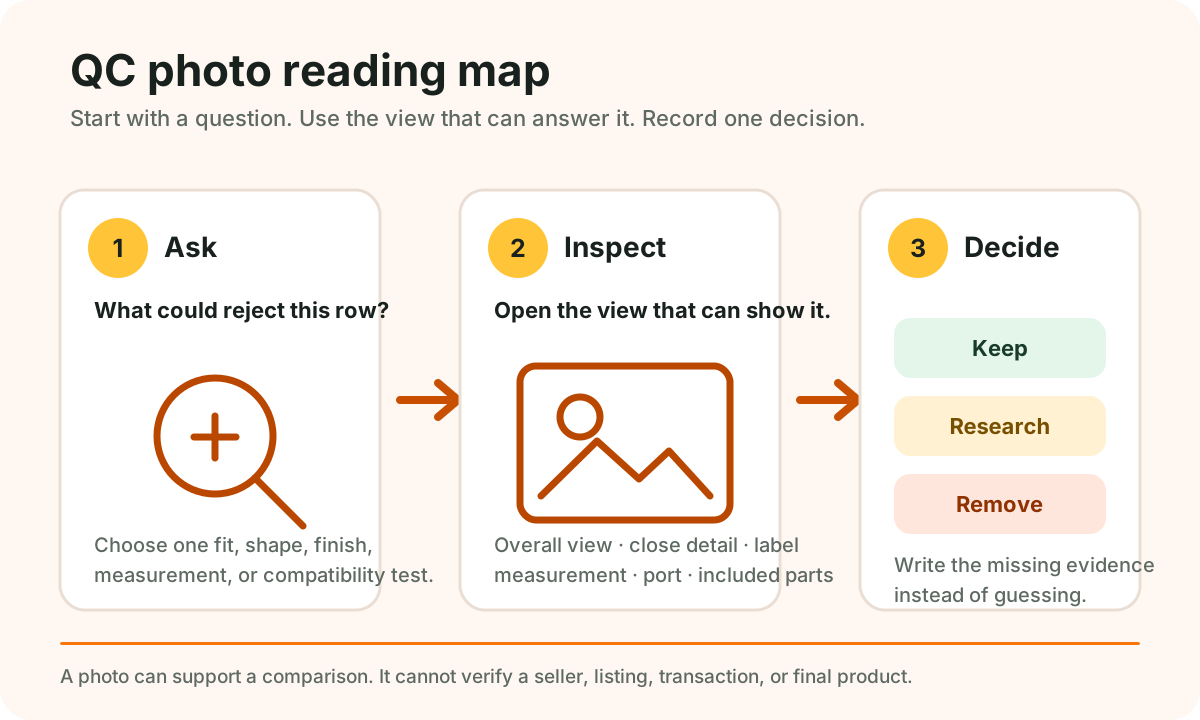
What a useful QC photo does
A useful image answers one concrete question: shape, dimensions, color, stitching, closures, labels, surface finish, or included parts. It should help you compare the item with the listing, not simply make the item look attractive.
Shoes and sneakers
One dramatic side angle with no sole, size, or top-down view. This can hide proportion and variant differences.
T-shirts, hoodies, jackets, and pants
Front and back, fabric surface, seams, cuffs, closures, print or embroidery close-ups, labels, and a measurement table that matches the pictured variant.
Folded photos without scale, measurements, fabric information, or a clear view of overall cut.
Bags and accessories
Front, back, base, interior, pockets, closures, strap attachments, hardware, dimensions, and an object that helps communicate scale.
Only the front surface is shown, leaving capacity, construction, fastening, and usable strap length unknown.
Watches and jewelry
Dimensions, clasp or fastening, side profile, back, dial or surface detail, material wording, and clear photographs under more than one light angle.
Heavy reflections, unclear scale, or decorative packaging that distracts from the item itself.
Electronics
Model and compatibility information, ports, plug type, labels, included parts, visible condition, and specifications that match the destination listing.
A powered-on screen or sealed box with no evidence about compatibility, configuration, restrictions, or support.
Lighting and color need caution
Warehouse lighting, camera processing, screen settings, and reflections can change perceived color. Compare several images, look for a neutral reference, and avoid treating an exact shade on your display as guaranteed.
Read the set in a fixed order
- Confirm the pictured category and variant.
- Check overall shape and proportion before close details.
- Look for the measurement, label, closure, port, or surface that matters most.
- Compare the photos with the destination listing and your saved row.
Looking in the same order each time makes missing views easier to spot. It also stops one polished close-up from deciding everything for you.
When the photo set is not enough
Stop when the images cannot confirm the chosen variant, hide a fit-critical measurement, contradict the listing, or leave compatibility unclear. Mark the row “research more” and write down the missing view. Do not treat more scrolling as a substitute for the evidence you need.
The three-question photo rule
- Which detail would make me reject this row?
- Which image should show that detail?
- Does the image answer the question clearly enough to compare?
